Mindful Mint
UX/Product Design Case Study
This is a zero-to-one product that helps online shoppers pause and reflect before purchase against the shopping experience that's engineered for speed.

Time
10 Weeks
Fall 2024
Platform
Web
My role
Product & UX Designer
Tools
Figma
Whimsical
Proven By Users
Methods
Usability Testing
Information Architecture
Wireframing
Prototyping
Competitive Analysis
UX Research
User Interviews
Scope & Team Dynamics
I led the end-to-end UX design process for the web platform.
I collaborated closely with two designers handling the mobile app and browser extension.
While we brainstormed and critiqued as a unified team, this case study focuses specifically on the strategic development of the web experience.
Project
This is a zero-to-one (0 -> 1) product development.
This application aims to support intentional user decision-making through features for
Potential-Purchase-Item organization
Reflective reminders, and
Spend-data.
The Problem
How might we provide Users with the autonomy to navigate digital shopping environments in a way that equips them to curb impulsive behavior?
The Outcome
Identified and validated critical navigation barriers within core reflective flows, evidenced by an 85.7% path error rate and 75% user confusion regarding label clarity, by conducting comprehensive Web Information Architecture testing and UX writing audits.
Optimized task success for 80% of consumer purchasing flows as measured by 100% completion rates in list management and item discovery, by simplifying former UX labels and removing navigation redundancies identified during usability testing.
Timeline
Keywords:
Zero-to-one product design, Product idea validation, User research, Behavioral UX Design, Design Systems, Intentional UX, Impulse control UX

Discovery Research + User Perspective
Market gap
Highlights
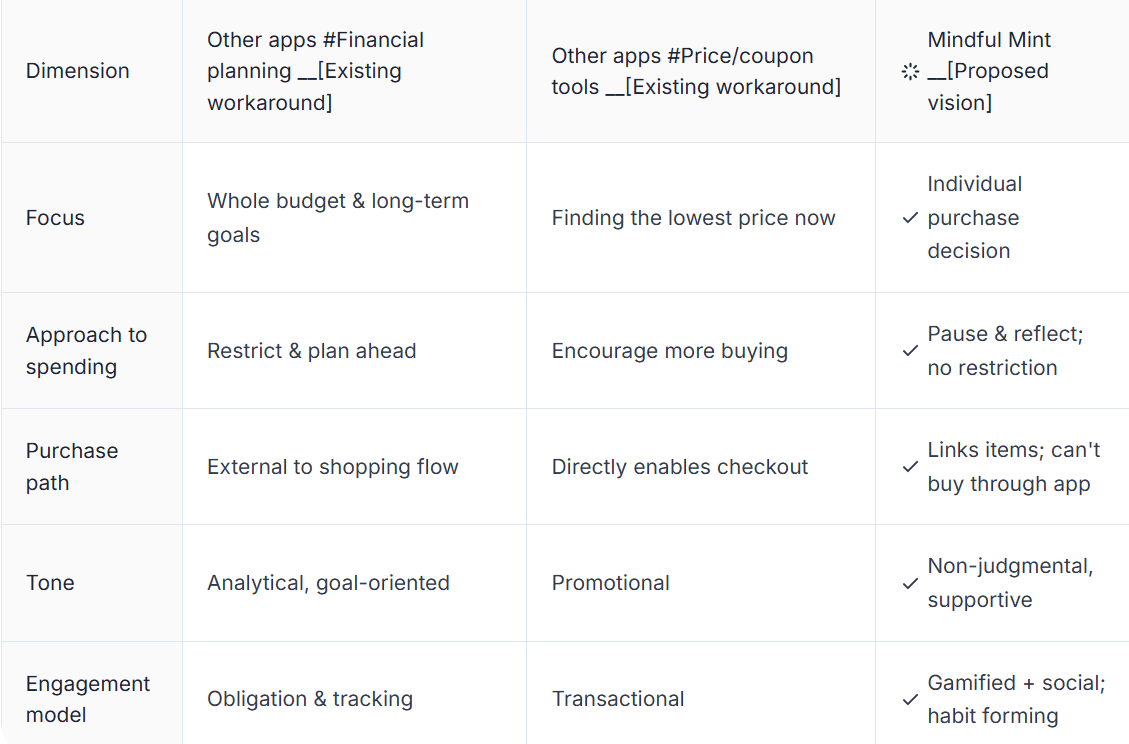
Current tools focus on 'Saving Money' (Coupons) or 'Tracking Money' (Budgets), but there is a consistent gap, an opportunity to focus on 'Saving the Decision' (User Agency).
Competitive Landscape Details
Competitive Analysis:
Everyone is solving for 'Cheaper,' no one is solving for 'Later'.

Each circle represents a competitor category (budgeting, coupons, listing apps), and the overlap in the center illustrates that none fully address impulse shopping on their own.

I mapped competitors and found that budgeting and coupon apps only solve one slice of the problem (impulse control).

Mindful Mint’s Unique Positioning
Assumptions and risk map comparing two product directions

The Human Need
Evidence of a Cognitive Gap
5 Zoom Interview Insights
5/5 Users
Utilized expedited checkout tools (AutoFill) and shop during late-night hours (evening/night).
Insight signal: Low friction
So what?
It reduced time to complete the checkouts and often during their winding down period.
4/5 Users
Based on their most recent impulse buys, they identify social media or promotional emails as the primary catalyst for shopping and later guilt.
Insight signal: Emotinal spending & External-triggers
How so?
Guilt surfaced often because the item was a duplicate of something they already owned or bought out of the spur of the moment.
So what?
It jeopardizes long-term brand loyalty.
Design should pivot from urgency-based triggers toward value-driven engagement to reduce return rates, post-purchase guilt and support user trust.
4/5 Users
Actively employ personal strategies to curb spending
Insight signal: Curbing startegies
Such as?
Such as leaving items in their cart for a 'Cooling off' period for 24 hours to a month before buying.
Who are the Users?
Routine Online Shoppers
Occasional Impulse Buyers
From Insight to Intervention
Turned primary user survey + interview insights into a prototype
To truly test this product idea (Mindful Mint), I realized I couldn't ask just questions, so I created a baseline.
I built Lo-Fi wireframes before my primary interviews to test if the idea of an 'intentional cooling-off period' was an appropriate friction or just a nuisance.
01
The Baseline
Since this is a zero-to-one product, I built a tangible reference point to anchor user feedback.
Core idea validated
02
The Intent
Used user stories to find the exact moments where "willpower fails."
Defined specific friction points.
03
The So What?
Translated user desires and pain points into a functional roadmap.
Strategic MVP prioritization.

Specify
Affinity Mapping
User Interview Analysis

Design thinking for the 'Intentional' Shopper
Which usability principles at the core of the product?
& Why?
Approachability
No setup required to start, Progressive disclosure
Can help lower entry barriers.
Can invites immediate, easy exploration.
User control and freedom
Price context without the push
Gives power back.
Removes the pressure.
Respects the user’s pace.
Habit loop
BJ Fogg's Behavior Model for behavioral design ; Leveraging Motivation to retain vs. apps that frequently prompts
Builds better routines.
Changes the shopping trigger.
Supports long-term mindfulness.
Realistic friction
Pause, don't block
Lowers entry barriers.
Invites immediate, easy exploration.
Retains agency
Project Goals & Methods

Features Evaluation against goals

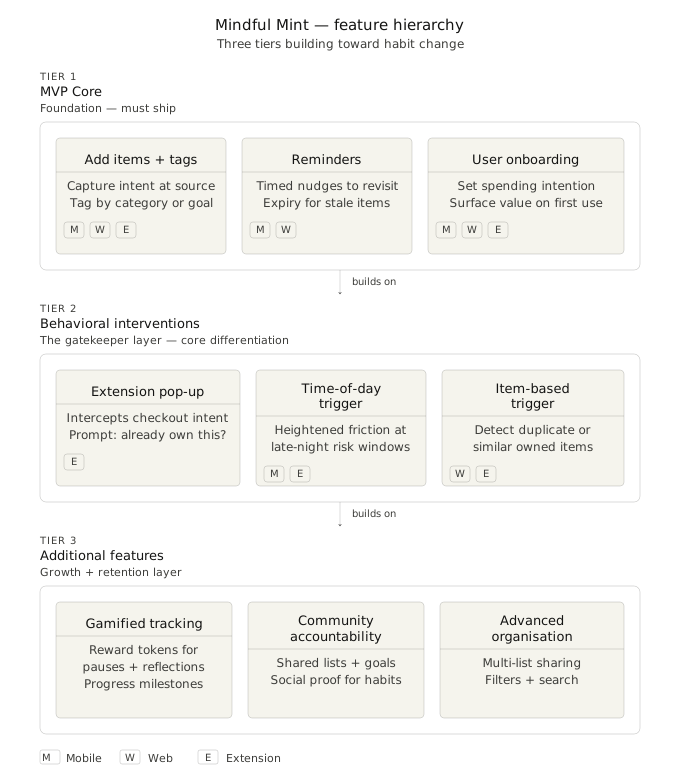
Defining the MVP: Feature Prioritization
This graphic is generated using Claude AI
Built
Deprioritized
Out of scope
User Flows
Concept

Adding Item

Updating Item Status & Item Details

Updating List Information & List Status

Design & Testing
Wireframes
Team developed lo-fi wireframes for three feature bundles, ranging from a lightweight reminder system to a full reflection dashboard.
Reviewing trade-offs based on users' responses between the lightweight version and a deeper engagement layer.
10 Cards:


1
List Management
It allows users to set boundaries that automate the cooling-off period.
Trade-off:
Providing extensive categorization (tags, status, price limits) offered high Usefulness but increased the interaction, users who wanted to save items quickly during a 'late-night scrolling' session found it lengthy.
The Resolve: Provide quick-select tags

2
Wishlist Overview
It serves as the central hub for tracking saved items.
Trade-off:
Prioritizing management icons (edit, bookmark, delete) for every item offers functionality but resulted in a denser UI.
The Resolve: Group secondary management actions

3
Product Review
Trade-off:
While inactive state of the purchase button is designed to encourage filling the details, it confused users with its inactive state at a glance.
The Resolve: Provide positive reinforcement

4
Product Review
The core UX Strategy of aligning user needs with the goal of curbing spending.
Trade-off:
Users commented it might lead them to abandon the app, it feels too restrictive.
The Resolve: Use transparent feedback tooltips
5
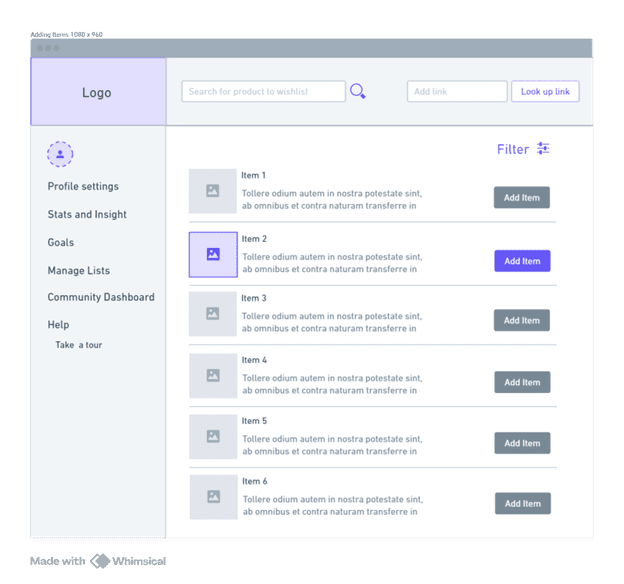
Search Results
This wire facilitates the start of the First Use stage by listing items with an 'Add Item' CTA
Trade-off:
The vertical list format is clear for comparison but limits the number of items visible on screen, requiring more scrolling.
The Resolve: Implement robust filtering and/or grid based layout

6
Guided Reflection Step 1
This is the first step in replacing assumptions with real-world user evidence through subjective sliders like 'Want it' vs 'Need it'.
Trade-off:
While essential for mindful spending, this extra step significantly slows down the 'Saving Item Flow' compared to a standard one-click save feature.
The Resolve: Consolidate the ask to the most relatable one or two items in reflection section.

7
Guided Reflection Step 2
This wire focuses on categorization and personal connection.
Trade-off:
Offering a custom message (feature) provides deep personalization but adds to the user's cognitive load; the team noted this might be moved to the next steps if they proved too complex to implement within the initial scope.
The Resolve: Offer generic templates

8
Set Reminder
This wire establishes the cooling-off period by allowing users to select specific timeframes.
Trade-off:
A full calendar view is highly precise but takes up significant screen real estate.
The Resolve: Use smart time presets

9
Item Summary
This final step summarizes all reflection answers and settings before the user hits 'Confirm & Save'.
Trade-off:
Adding a summary screen acts as a final gatekeeper, though it adds a third click to a process the team initially hoped would be smooth and efficient.
The Resolve: Maintain high scannability
IA Testing
Team ran two rounds of tree testing with 11 participants across 5 tasks to pressure-test our architecture logic before committing to visual design.
IA Takeaway
The root issue is not the architecture; it's the language. Users navigated the structure reasonably well once they arrived at the right section. What stopped them was choosing the wrong entry point because the labels, So we worked on our label logic before the next phase testing.
3 of 5
Tasks failed in both versions
Reflection, pending items, and statistics location consistently below 40% correct
Finding 01 · Language
Product vocabulary doesn't match user vocabulary
87.5%
Took wrong path on reflective actions
Highest failure rate of any tasks, users had no mental model for 'reflection' as a UI category
Finding 02 · Structure
Statistics lived in two places, neither felt primary
1 fix
Caused a major regression
Renaming one working label between rounds dropped that task from 87.5% → 33.3% correct
Finding 03 · Iteration
V2 improved reflection but regressed on product info
"The labels were mostly clear, except for the last one, which I was confused by greatly, I honestly just guessed"
User 2
Interactive Prototype
Real estate Conceptualization

IA Entry Hub

Flow: Create a list

Flow: Search for an item & Add to temporary holding space (Review basket)

Flow: Quick pending product evaluation

Flow: Accessibility of purchase link

Usability Testing
6
Participants
Ages 24–29
Snowball sampling
1
Round completed
Planned 2 rounds, adjusted after IA testing timeline shift
High-fi reserved for round 2 to simulate realistic experience
5
Tasks total
5 happy path + task completion rates + time consumed mapped.
Usability Testing Takeaway
WHAT WORKED
Creating a list, searching for items, adding to the review basket; all completed without friction
Labor-hours price calculator well-received, users found it meaningfully different from standard price display
Desktop capability appreciated by users who preferred web over mobile for this type of task
Having all lists in one place felt organised and convenient
WHAT FAILED
'Pending Product Evaluation'- non-intuitive. Users tried to access it via 'Quick Access' [wrong destination] versus 'All Lists.'
'List Management Dashboard' vs 'All Lists' redundant in users' mental model despite serving different purposes
Homepage links directed to the same destination, felt redundant even though each had a distinct purpose
Measurable design improvements
Hesitation rate ↓
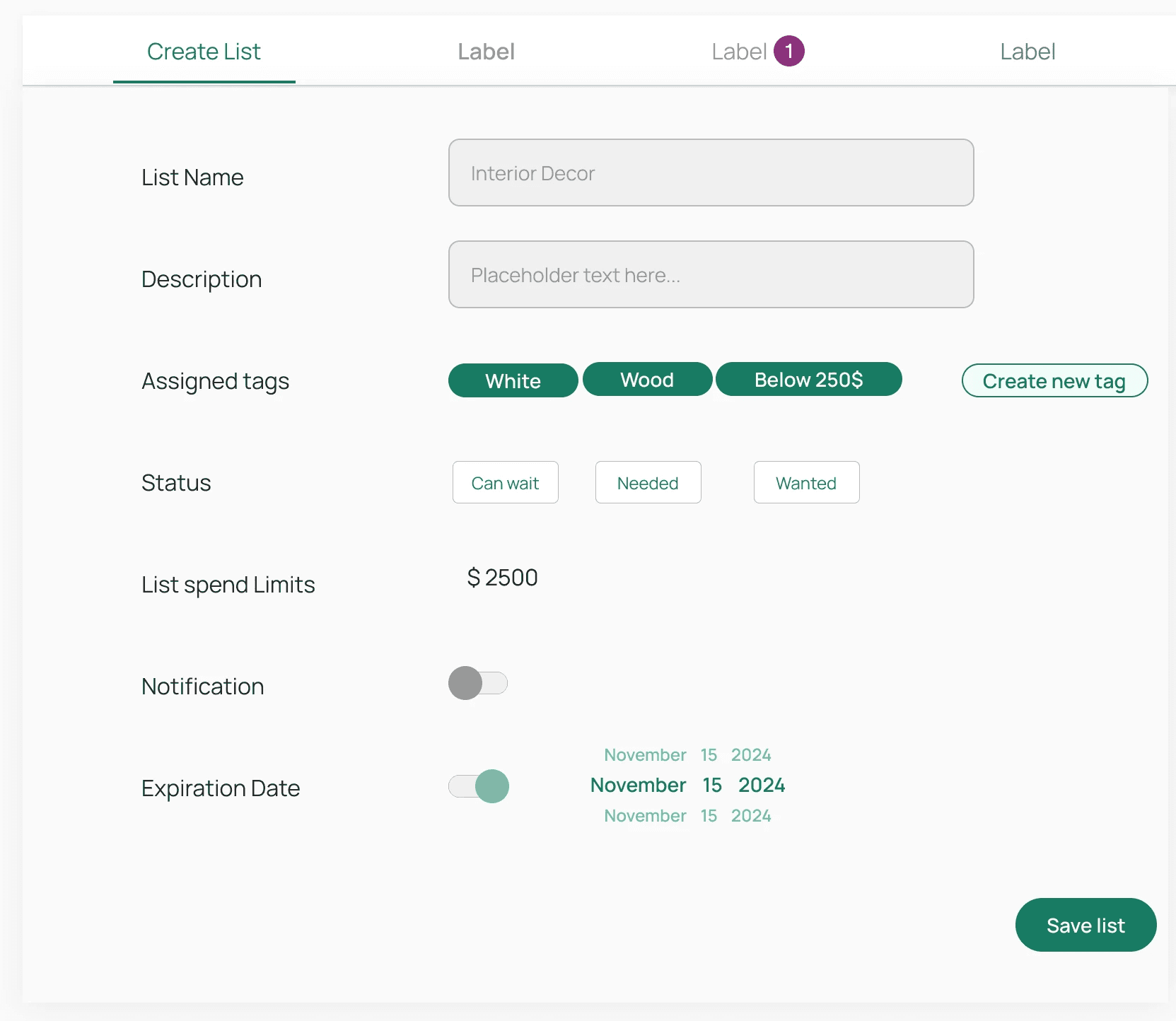
List creation step
Users stalled at ambiguous required fields such as expiration date and notification, before seeing any value from the tool.
Before
After
What changed: Fields made optional · Added toggles
Completion rate ↑
Pending product evaluation flow
Users dropped out or navigated incorrectly due to confusing terminology and multiple entry points leading to the same task.
Before
After
What changed: Plain-language renaming · single consolidated entry point

Final Takeaways
User experience is not always about removing friction but it's about providing the right friction at the right time.
AI integration could be the powerhouse in redefining the user-agency in user behavioral aspects.
Key Learnings
Leadership & Teamwork
Designing for friction
Tradeoffs & Iterations