Amazon Web
Case Study of Web Accessibility Audit
Evaluation date: 20 May 2025
Summary
Millions of Amazon users navigate the web differently, with screen readers, keyboard shortcuts, and assistive tools. This is an evaluation of where one of the world's most-visited e-commerce sites has an opportunity to improve, and what it would take to close that gap.
WCAG 2.1
NVDA (Screen reader)
Inclusive design
Assistive Technology Testing
Research Synthesis
Why
70 million U.S. adults live with a functional disability (CDC, 2024). Amazon sees 2.72 billion visits a month. It's tens of millions of real people trying to find a product, complete a purchase, or simply navigate a page.
And the fact that e-commerce accounts for 77% of all web accessibility lawsuits in 2024 isn't just a legal statistic, it's a signal. When a site isn't accessible, it doesn't just create friction. It excludes. Behind each filing is someone who encountered a barrier that should be addressed.
Credits: Researched with Claude AI.
This audit aims to understand what those barriers look like on one of the world's most visited sites and what it would take to meet the user experience for screen reader and keyboard-only users.
The Problem
How might we make sure that every Amazon customer, regardless of how they navigate, can browse, discover, and purchase with the same confidence as anyone else?
Scope
Pages evaluated
Given Amazon's global impact, I evaluated Amazon web's most visited two pages.
Homepage

Primary evaluation page scope:
Navigation, hero carousel, product listings
Best Sellers page

Subpage focus:
Repeated product grid patterns and category navigation
Scope & Limitations
Focused evaluating the consistent elements such as navigation, carousels, and product listings.
Completed the review of two pages within the project timeline. Due to time constraints, the full checkout flow has been moved to a future scope.
Findings were cross-checked between automated accessibility tools and NVDA for validation.
Project Specs
Time
4 Weeks
Spring 2025
Tools
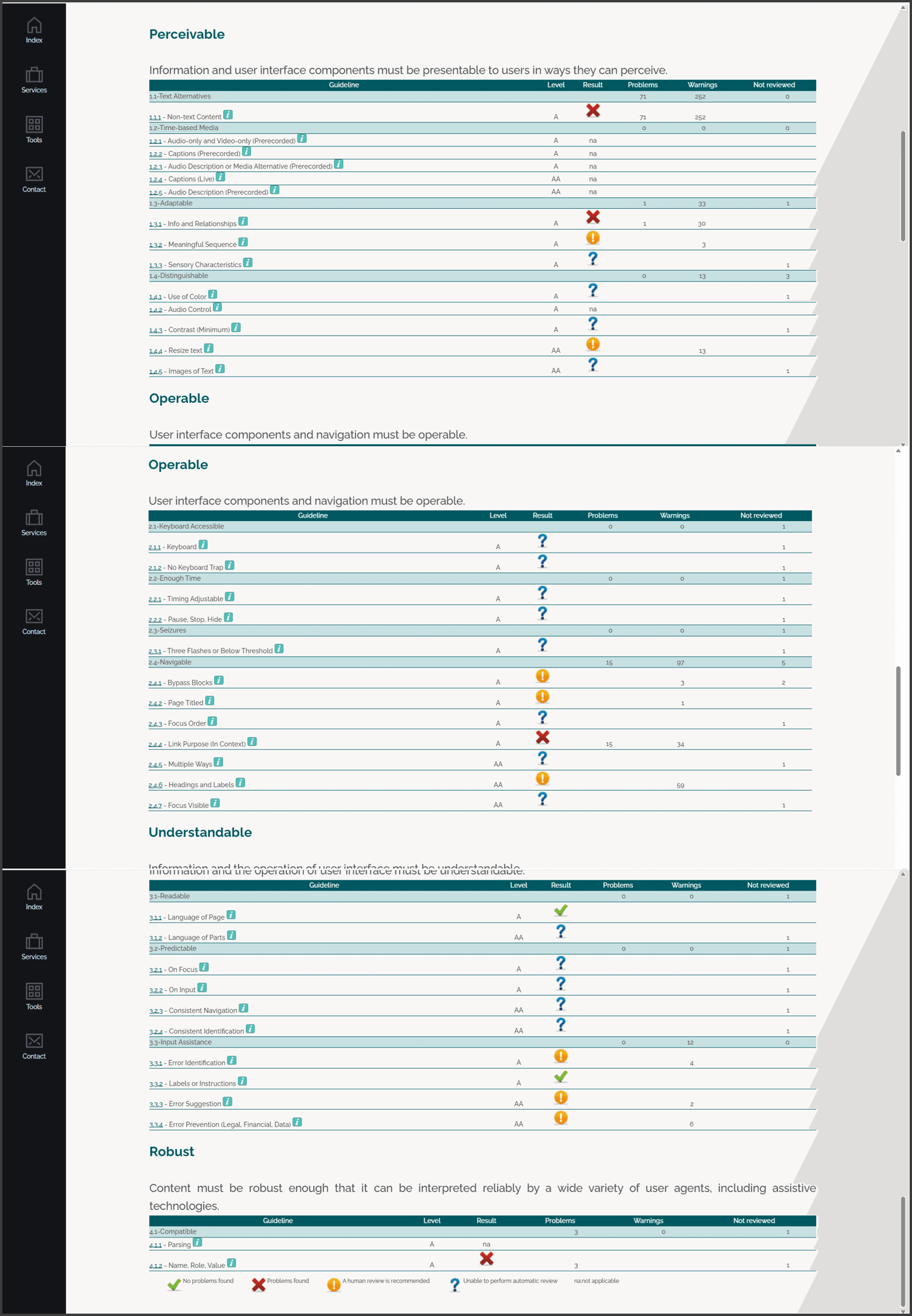
TAW (WCAG 2.1, Level AA)
WAVE (Web Accessibility Evaluation Tool)
Chrome lighthouse (Chrome audit)
Methods
W3C (Easy Checks)
HTML and CSS Validators
Manual ARIA attribute inspection
Readability test using Readable.com
Platform: Web
Browsers used
Google Chrome

Primary browser, evaluated as of 20 May 2025
Microsoft Edge
Cross-browser validation for rendering consistency

Process
What I did & what I found

4
Used the lens of WCAG’s POUR framework for evaluation.
(Perceivable, Operable, Understandable, Robust).

6
TAW problems
80
TAW warnings
15
Manual checks
9
Prioritised recommendations
Findings
What I'd fix
Prioritised findings based on combining severity + frequency
Critical - Fix first
Critical
Missing skip link and ARIA landmarks
POUR: Operable · Every page load forces repetitive tabbing for screen reader users
Critical
Missing, mislabeled, or inconsistent alt text on images, especially product banners and icons
POUR: Perceivable · Blocks product understanding entirely for screen reader users
High - Address next
High
Inconsistent focus indicators on interactive elements
POUR: Operable · Breaks keyboard-only navigation flow across multiple interactions
High
ARIA applied to generic <div> and <span> instead of semantic tags
POUR: Robust · Undermines screen reader structure even when developers intended accessibility
Medium - Schedule for improvement
Medium
Unclear heading and button relationships revealed by NVDA (Appropriate Semantic structure application)
POUR: Perceivable · Disorienting but navigable via keyboard shortcuts
Medium
Verbose carousel descriptions,reduce redundant speech output and inefficient dropdown navigation
POUR: Operable · Creates friction and fatigue, not full blockage
Medium
Complex menus disrupting predictable navigation
POUR: Understandable · Encountered frequently but workaroundable
Low- Technical debt to address over time
Low
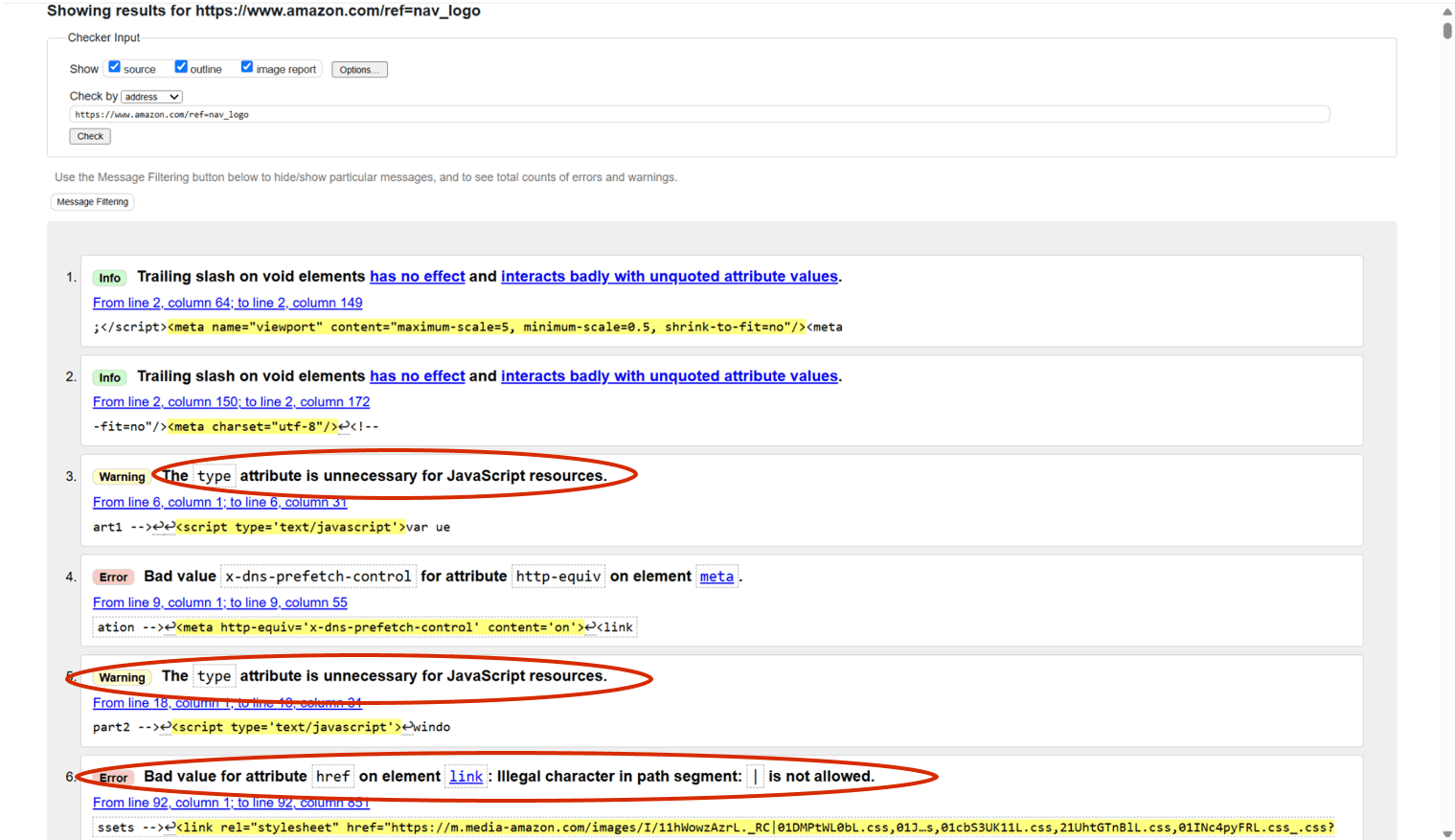
Deprecated HTML attributes (e.g. type="text/javascript")
POUR: Robust · Browser compatibility risk, not an immediate user barrier
Low
Reading level at Flesch-Kincaid 9.4 / Fog Index 10.6
POUR: Understandable · Above WCAG 3.1.5 target but no observed failures on tested pages
Insights
The discovery
Two modes, two experiences
Let's call this Mode A
Arrow key navigation
NVDA reads content linearly, just visible text in order. No headings announced, no landmarks, no sense of where you are in the page. Like reading a document with all formatting stripped away.
Slow, detailed reading
Let's call this Mode B
Shortcut navigation (H / D keys)
NVDA announces semantic roles and levels, "Heading level 2: Today's Deals", "Navigation region: Main Menu." Jump straight to important sections. Structure becomes navigable.
Fast, structure-aware browsing
The Key insights
Since both modes serve different user needs, the accessible design must support both sets of needs.
Amazon has ARIA. It has headings. But if a user doesn't know to press H, none of that effort reaches them. Screen reader education is as much a part of inclusive design as semantic markup itself.
Reflection
The gap between infrastructure and experience
A site can have correct ARIA and still feel inaccessible; the gap depends entirely on what the user already knows about their screen reader.
Automated tools can't catch lived experience
TAW and WAVE flagged structural issues, but only manual NVDA testing revealed the difference between arrow-key and shortcut navigation.
Design responsibility extends to discoverability
Designers and developers have a role not just in building accessible experiences, but in considering how those experiences are discovered, learned, and used.
Takeaways
Lessons
Design implication
Build for both modes
Arrow-key users need clean linear content. Keyboard shortcut users need a meaningful structure.
Neither should be an afterthought.
Broader responsibility
Educate alongside building
A well-structured site that no one knows how to navigate is only half a solution. Users might miss all that effort if they don’t know how to use screen reader features like Browse vs. Focus mode or keyboard shortcuts.
Onboarding and help content work as a torch that casts light on the path. Without adequate light, the destination could get blurry.
Glimpse
W3C Validator tool
Readable.com

WAVE Web Accessibility Evaluation Tool

TAW Accessibility Tool
TAW stands for Test de Accesibilidad Web (Spanish for Web Accessibility Test)